Calculator Update 1.6.0 - How the new calculation methods work
First published: · 6 min read
Written against Calculator v1.6.0
It’s been a while
It’s been nearly three months since 2110.tools was launched and with over 200 unique users across 15 countries I couldn’t be more thrilled with the support it’s had. Since launch back in August I’ve been slowly working on all the things that I’d set out to do since day 1, but didn’t have the time (or skill) to implement back then. I could’ve used AI to get here much faster - but I’ve enjoyed learning, getting frustrated and eventually making achievements - that’s what makes a good hobby. So here is the result of all of that work!
The main focus of this update was to add new algorithms to the video stream calculations. I was never happy about some of the assumptions Calculator made in the first release so a lot of work has gone into really emulating how 2110-20 senders create packets. Along with that there’s plenty of fixes and improvements sprinkled in too.
New Features
Video Calculation Methods
This is the biggy. You’ll see when creating a new video stream there’s two new options Calculation Method and Allow packet wrapping. With this there are 5 total calculation algorithms to pick from and they all produce differing results - the idea being that it’s easy to compare how different devices, tools and even modes on the same device might behave at various formats.
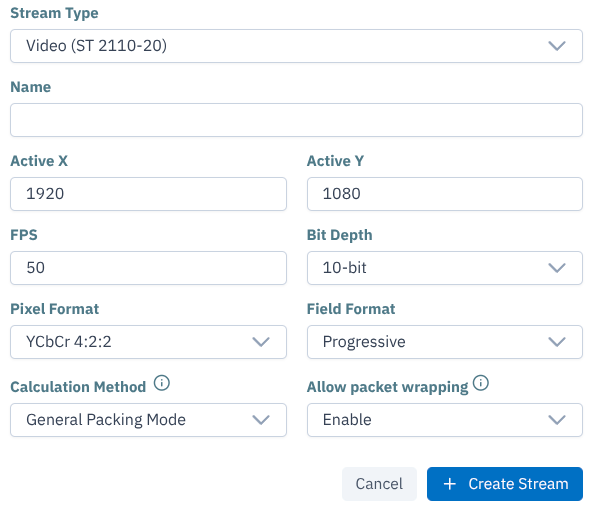
Classic
Classic is the OG algorithm from the launch release of 2110.tools but with a couple of tweaks so it can produce a more data-rich output. This is what I would call an ‘enhanced’ version of the mathematical equation that SMPTE teach you in their courses. You can read more about how it works on this blog post but essentially it works out a single line of pixels and duplicates that across all remaining lines in the frame. This results in values that are close and is a fantastic starting point if you don’t know what packing mode your device uses.
General Packing Mode (GPM)
General packing mode is the default packetisation method for -20 senders. Every sender should be able to handle this mode - hence the name ‘General’. In this case Calculator does a lot more computation to get to a result. It builds a frame packet-by-packet and handles dynamic headers and various end-of-line scenarios. These dynamic headers and the end of line logic is why it walks through an entire frame, because from a packet perspective it’s very common for every line to be completely different.
Imagine that we can fit 286 4:2:2 10-bit pgroups into a packet (that’s 572 pixels). With a 1920 wide line we need 3.35 packets. You might think, that’s fine, just send a smaller packet. Well we can, and that’s what we call a truncated packet. However, because the headers for a truncated packet are the same size as the headers in a full packet, we’re going to be quite a bit less bandwidth efficient because the header-to-payload ratio gets worse. This isn’t a huge problem at smaller frame sizes but this inefficiency quickly adds up for larger formats, high frame rates and links carrying many flows.
So to be more efficient we can enable ‘wrapping’. Wrapping isn’t the real term for this process but I think it effectively explains what is happening so I am running with it. Wrapping allows one packet (like the one that would only be 35% full from the last example) to capture Sample Row Data (pixels) from another line. Great, so we can fill the remaining 65%? Well… not quite. Part of the spec for -20 is that there’s some additional payload headers that help the receiver decode the packets. It contains information like the number of pgroups this Sample Row Data contains, and it’s location within the frame. This happens because every packet from the same frame gets the same timestamp - so if the packets get mixed up in transmission the receiver needs to know how to reassemble them. However, if we’re now saying that the remainder of this packet now also contains data from another Sample Row we need another set of this identifying information, which eats into our available payload space - so we have to account for that.
So at the end of a row the following can happen:
The row perfectly divides by whole packets - in that case Calculator carries on assembling full packets without a care in the world.
Calculator can wrap the packet to contain pgroups from up to three lines - if you have wrapping enabled. This does come with the cost of slightly inflated headers but usually that trade-off is worth it unless the horizontal frame size is small.
Calculator can truncate the packet - if you have wrapping disabled or it reaches the final packet in the frame in which case it has no choice but to truncate.
Calculator can wrap and truncate - if you have wrapping enabled and the horizontal frame size is small enough.
Calculator then makes all of these decisions for every line of pixels until it reaches the end. Fortunately because of the way the timestamping works we have to start again for the next frame. Which, as long as the frame is the same size and format as the last one, will be packetised in the same way. So once we’ve made a list of all the packets and their sizes for one whole frame we can copy that for every remaining frame in that second.
You can see how various frame sizes and formats can affect how many packets are needed by hovering over a card to see detailed results. Have a go for youself.
Block Packing Mode (BPM)
This is very similar to GPM except pgroups are handled in blocks of 180 bytes. I won’t go into as much detail because the process is essentially the same as GPM but with the added complication of building and handling the blocks of 180 bytes.
One thing that is worth mentioning… If there aren’t enough pgroups either at the end of a line or end of the frame to fill the 180-byte block - we have to pad it out. Which basically means that if you’ve only got a single 5-byte pgroup, for example, we still have to transmit a block that is 180-bytes.
I am sure there is a very computer science-y reason why this mode exists - but it can be quite inefficient if your format and frame size falls within a scenario where blocks have to get padded out.
You can tell if your sender is sending a BPM stream by looking at the SDP file. PM=2110BPM or PM=2110GPM
All New features and improvements
| Change | Change Type |
|---|---|
| Add BPM & GPM Calculation Methods | New Feature |
| Add duplicate methods to streams and flows | New Feature |
| Add warning dialog to explain what ‘Delete All’ does | Front end / Usability Improvement |
| Combine Settings and Edit dialogs in Flows and Links into a single dialog | Front end / Usability Improvement |
| New site menu/header across landing page and blog pages | Front end Improvement |
| Add in-memory cache for video calculation results | Performance Improvement |
| More efficient API use from the front end | Performance Improvement |
| Better handling of default stream name-numbers | Usability Improvement |
| Better error handling | Back end improvement |
| Make object update methods atomic | Back end improvement |
| Fixed a mathmatical error where the ANC algorithm was not padding the words correctly | Calculation Improvement |
| Added validation on audio stream creation/modification to check if custom values don’t exceed available payload space | Back end improvement |
| Fixed error in the receiver type chart in the front end | Front end improvement |
| Fix bug where editing a link flow assignment would return the old assignment not the newly edited one | Back end improvement |
| Make JSON import atomic and add more validation | Persistence improvement |
| Add JSON import upgrade functionality to import old schema without error | Persistence improvement |
| Added frame size limits on video streams | Back end improvements |
| SEO optimisation | Front end improvements |
As always I hope you found some use out of my ramblings and if any of this article, or 2110.tools is helpful then please consider supporting the project by buying me a coffee.